 vlayer docs
JavaScript API
Automate navigation and interaction on the target site while a data source is proving.
Why use the Javascript API?
Simple datasources can direct users to a specific URL and capture HTTP requests directly. However, most real-world scenarios require user interaction — logging in, clicking buttons, or navigating through redirects.
The JavaScript API provides a solution: it's JavaScript code that executes on the page ahead of the proving process. Data source developers can use standard browser APIs plus Vouch-specific helper functions to automate these interactions.
Example
async function main() {
  // Show processing overlay to prevent user interaction
  openProcessingOverlay({ text: "Fetching dashboard state..." });

  if (window.location.pathname === "/login") {
    // Close overlay - user should be able
    closeProcessingOverlay();
  }

  if (window.location.pathname === "/dashboard") {
    // This will resolve only when .user-data element has some text
    await waitFor(async () => {
      // Wait for .user-data element to appear
      const [dataElement] = await waitQuerySelectorAll(".user-data");
      return dataElement && dataElement.textContent.length > 0;
    });
  }
}
Main function
The main function is your code's entry point. It's automatically called after the page loads.
Important: Don't call main manually — this will cause it to execute multiple times and lead to unexpected behavior.
Execution lifecycle
Your JavaScript code executes every time a document loads in the active tab. This has important implications:
- State resets on navigation: After redirects or page refreshes, execution state resets. Best practice: check the current URL first, then perform page-specific tasks.
- Single tab only: The script won't execute if the page opens in a new tab.
Helper functions
waitQuerySelectorAll
function waitQuerySelectorAll(selector: string, timeout?: number, interval?: number): Promise<HTMLElement[]>Waits for elements matching a CSS selector to appear in the DOM.
Parameters:
selector: CSS selector to matchtimeout: Maximum wait time in milliseconds (default: 5000)interval: Check interval in milliseconds (default: 100)
Returns:
- Promise resolving to an array of matching Elements
waitFor
function waitFor(predicate: () => boolean | Promise<boolean>, timeout?: number, interval?: number): Promise<void>Waits for a condition to become true.
Parameters:
predicate: Function resolving to booleantimeout: Maximum wait time in milliseconds (default: 5000)interval: Check interval in milliseconds (default: 100)
Returns:
- Promise that resolves when the predicate returns true
Throws:
- Error if the predicate doesn't return true within the timeout
reuploadAttachment
function reuploadAttachment(attachment: AttachmentFile): voidTrigger a file upload.
Parameters:
attachment.url: URL from which to upload the fileattachment.fileName: Name of the fileattachment.mime: MIME type of the file
openProcessingOverlay
function openProcessingOverlay(options?: CreateOverlayOptions): voidCreates an overlay that blocks user interaction with the page.
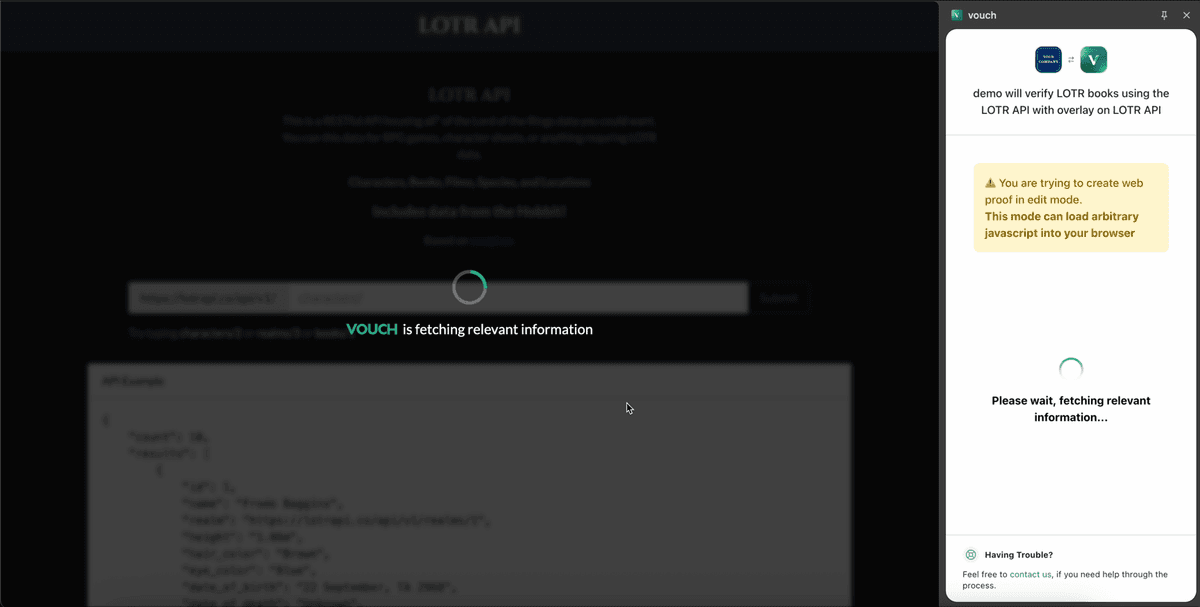
Parameters:
options.text: Text to display to the user (default: "is fetching relevant information")options.withVouchLogo: Whether to show the Vouch logo (default: true)
closeProcessingOverlay
function closeProcessingOverlay(): voidCloses the overlay created by openProcessingOverlay(). Does nothing if no overlay exists.
Last updated on